
Table of Contents
Most model releases claim “better reasoning” or “more multimodal power”. As developers, we’ve learned to ignore that noise. What matters is simple: can it help me solve real problems faster without babysitting it?
Gemini 3.1 Pro is one of the first models that changes how you structure work, not just how you autocomplete text. It feels less like a smart chatbot and more like a system component you can plug into serious pipelines.
This matters because we’re moving from “AI as a helper” to “AI as an execution layer”.
What Actually Changed (From a Developer’s Perspective)
The headline improvements are not flashy features. They’re capability shifts.
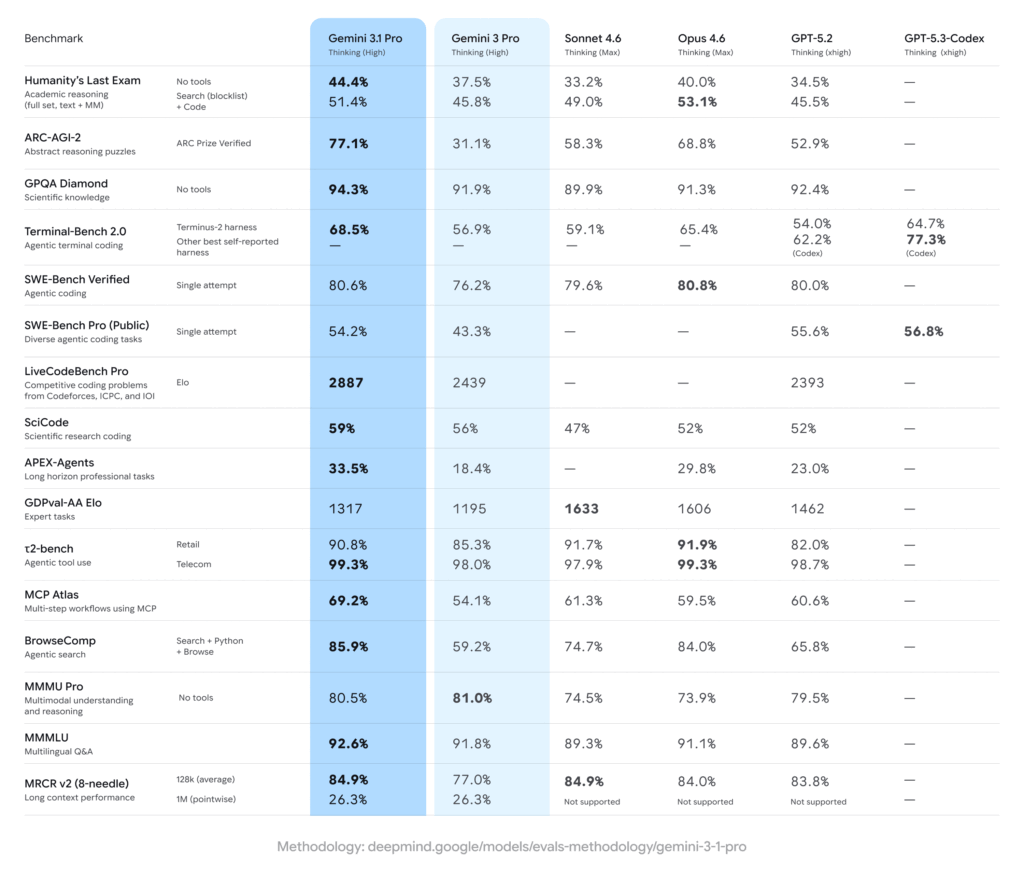
The model handles very long context, complex reasoning chains, multimodal inputs, and tool use in a way that finally feels stable enough for production systems.
Think of earlier models like smart interns. Gemini 3.1 Pro behaves more like a mid-to-senior engineer who can keep a large architecture in their head.
1. Long Context That’s Actually Usable
We’ve had “long context” before, but most models degraded badly as context grew. They would forget earlier constraints, mix instructions, or hallucinate connections.
Gemini 3.1 Pro can ingest massive inputs and still track what matters.
Why this is huge in real systems:
You can feed it:
- Entire repositories
- Months of logs
- Long legal or technical docs
- Multi-file specs
And ask questions that depend on relationships across all of them.
Example use case that becomes realistic:
You paste a microservice repo, deployment configs, and production error logs, then ask:
“Why does this service fail only under autoscaling?”
Earlier models would give generic guesses. This one can trace config mismatches across files.
Mental model:
It’s less like search and more like having a system-wide debugger.
2. Reasoning That Survives Multi-Step Tasks
Many models can solve puzzles but fail in messy engineering tasks because real problems aren’t clean.
Gemini 3.1 Pro handles chained reasoning better:
- Diagnose → hypothesize → simulate → refine
- Understand requirements → design solution → generate code → explain tradeoffs
It doesn’t collapse as easily mid-way.
This opens doors for workflows like:
Design review assistant
Architecture exploration
Migration planning
Performance tuning suggestions
It’s especially strong when tasks involve constraints that must remain consistent across steps.
3. Multimodal That’s Actually Useful
Multimodal used to mean “describe this image”.
Now it means understanding systems through multiple input types.
You can combine:
- Diagrams
- Screenshots
- Code
- Logs
- UI recordings
Example:
Upload a screenshot of a Kubernetes dashboard spike, paste metrics, and include deployment YAML. Ask what’s happening.
This starts to feel like debugging with a teammate who can see your entire screen and infra.
4. Tool Use and System Integration
This is where things get serious.
Gemini 3.1 Pro is designed to operate with tools, not just text prompts.
In practice, this means:
- Calling APIs
- Running code
- Querying databases
- Acting as an orchestrator
You can build agents that don’t just answer questions but perform tasks.
Think CI assistants, automated triage bots, or infra copilots.
We’re basically getting closer to “AI as a programmable subsystem”.
5. Cost Matters More Than People Admit
One practical detail that doesn’t get enough attention: Gemini 3.1 Pro is significantly cheaper than competing frontier models.
At the time of writing, it comes in at more than 50% lower cost compared to Claude Opus 4.6 for similar high-end reasoning workloads.
Why this matters for engineers:
If you’re experimenting locally or building prototypes, price differences don’t feel huge. But in production, model cost becomes infrastructure cost.
Examples where this changes decisions:
Large-scale document processing
Always-on internal assistants
CI/CD analysis bots
Customer-facing systems
Agent workflows that loop
A model that is 2× cheaper can mean:
You can afford longer context
You can run more reasoning passes
You can avoid aggressive caching hacks
You can ship features you would otherwise cut
In other words, capability is only half the story. Cost determines whether you can actually use that capability at scale.
This is why Gemini 3.1 Pro feels less like a research demo and more like something you can realistically build products on.
Where It Fits in a Real Stack
If you’re building developer tools, internal automation, or knowledge systems, this model can replace multiple smaller components.
Use it when you need:
Complex reasoning over large state
Understanding across files or modalities
Decision-making, not just generation
Avoid using it for trivial tasks. It’s overkill for autocomplete or simple chat.
Limitations You Should Expect
It’s powerful, but not magic.
You still need:
Clear prompts
Guardrails
Verification layers
Human review for critical paths
Treat it like a strong but fallible engineer. Not an oracle.
Latency and cost also matter if you plan real-time usage.
What This Means Long Term
We’re shifting from “prompt engineering” to “system design with AI components”.
Future architectures will look like:
Input streams → reasoning models → tools → feedback loop → output
Gemini 3.1 Pro is a step toward models acting as control layers rather than text generators.
If you’re a developer, the key skill isn’t learning prompts. It’s learning how to structure problems so models can reason about them.
That’s the real unlock.
If You Remember Only One Thing
Gemini 3.1 Pro isn’t impressive because it writes nicer text.
It’s impressive because it can hold a complex system in context and reason about it without falling apart.
That’s what makes it useful for real engineering work.
Learn more on deep topics
https://www.manrahul.in/branch-prediction-cpu-explained
References and Sources
https://blog.google/innovation-and-ai/models-and-research/gemini-models/gemini-3-1-pro/