
Table of Contents
When we write code, we usually think the CPU just “reads from RAM” and executes instructions. That’s technically true, but practically… it almost never works that way.
If the CPU had to wait for RAM every single time, your system would feel unusable. The CPU is insanely fast. RAM is fast too, but not fast enough for modern CPUs.
That gap is where CPU cache comes in.
Let’s break it down simply.
CPU Cache (L1 / L2 / L3) – How Data Actually Reaches the CPU
A modern CPU can execute billions of instructions per second. RAM access, even with DDR5, is still hundreds of CPU cycles away.
So if the CPU did this:
execute instruction
fetch data from RAM
wait
wait
wait
execute next instruction
Most of the time, the CPU would just sit idle.
That’s unacceptable. Hence, cache.
What Is CPU Cache (In Simple Terms)
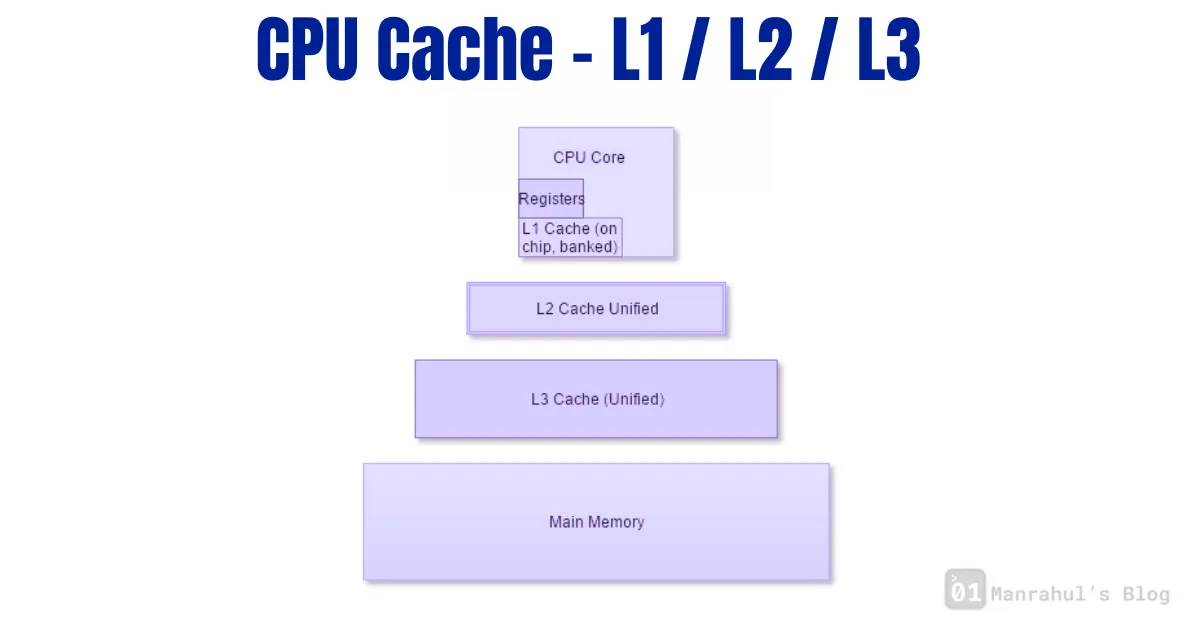
CPU cache is small, extremely fast memory that sits very close to the CPU cores.
Instead of going to RAM every time, the CPU tries to get data from cache first.
Think of it like this:
- RAM = warehouse
- Cache = items already kept on your desk
- CPU = you working
You don’t walk to the warehouse for every pen stroke.
The Cache Levels: L1, L2, L3
L1 Cache – Fastest, Smallest, Closest
- Lives inside the CPU core
- Extremely fast
- Very small (usually KBs)
Most CPUs split L1 into:
- L1I (instruction cache)
- L1D (data cache)
This is the first place the CPU looks.
If data is here, access is almost instant.
L2 Cache – Still Fast, Slightly Bigger
- Also usually per-core
- Bigger than L1
- Slightly slower than L1
If L1 misses, CPU checks L2.
Still very fast compared to RAM.
L3 Cache – Shared, Bigger, Slower
- Shared between multiple cores
- Much larger (MBs)
- Slower than L1 and L2, but still way faster than RAM
This helps when:
- Multiple cores need the same data
- Data doesn’t fit in L1/L2
How Data Actually Reaches the CPU (Step by Step)
Let’s say your code accesses a variable.
- CPU checks L1 cache
- If not found → checks L2
- If not found → checks L3
- If still not found → goes to RAM
- Data is fetched from RAM
- Data is copied back into L3 → L2 → L1
- CPU finally uses it
This whole process is called a cache miss chain.
Once the data is cached, future access is fast.
Cache Hits and Misses (Why Performance Changes)
- Cache hit: Data found in cache → fast
- Cache miss: Data not found → slow
Your program’s performance often depends more on cache behavior than raw CPU speed.
That’s why:
- Sequential memory access is fast
- Random memory access is slow
- Large data structures hurt performance
- Tight loops feel magically fast
Why CPUs Cache More Than You Ask For
When the CPU fetches data, it doesn’t fetch just one variable.
It fetches a cache line (usually 64 bytes).
Why?
Because CPUs assume:
If you used this data, you’ll probably use nearby data next.
This is called spatial locality.
There’s also temporal locality:
If you used this data once, you might use it again soon.
Most real-world code follows these patterns.
Why This Matters for Software Engineers
You don’t need to think about cache every day, but it explains a lot of “weird” things:
- Why iterating arrays is fast
- Why linked lists are slower
- Why false sharing kills multithreaded performance
- Why CPU usage looks low but code is slow
- Why optimizations sometimes backfire
At low-level or performance-critical code, cache behavior matters more than clever algorithms.
Common Misunderstanding
“More RAM will make my program faster”
Not necessarily.
If your working data already fits in cache, more RAM won’t help at all.
Cache efficiency > RAM size for performance.
Learn more like this > What is a Register in CPU? The Fastest Memory Explained
Final Thought
CPU cache is not an optimization trick.
It’s the only reason modern computers work at all.
Once you understand cache, performance issues stop feeling random.
They start feeling predictable.
And that’s when you really start writing better software.