Table of Contents
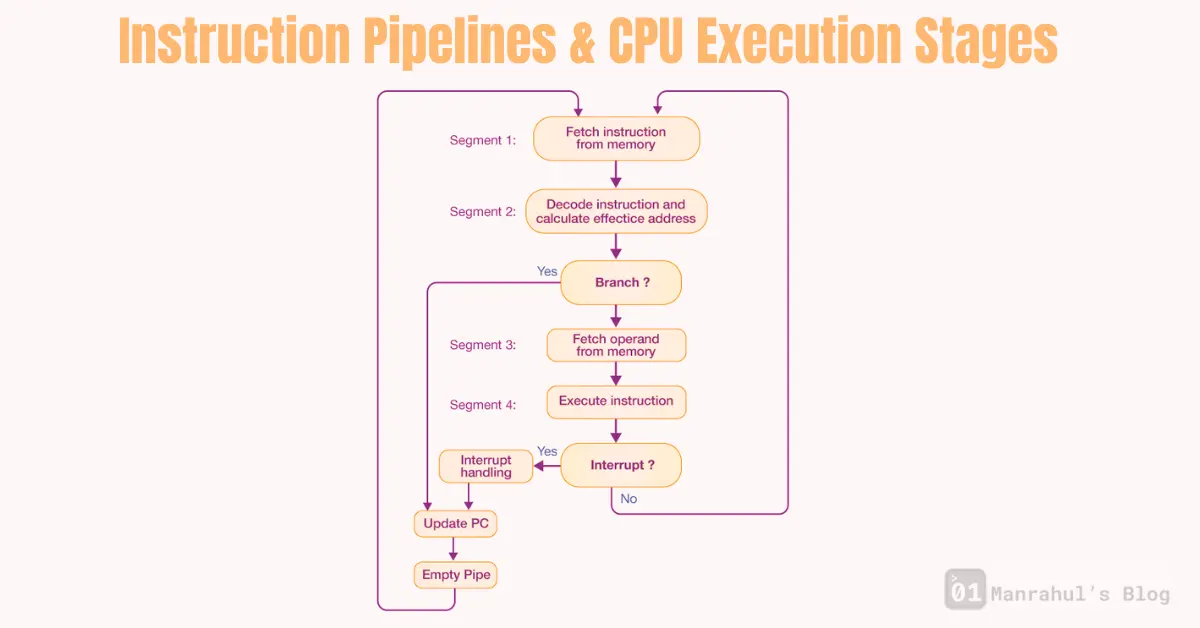
The Basic Idea: CPUs Don’t Do One Thing at a Time
If a CPU fully finished one instruction before starting the next, performance would be terrible.
Instead, CPUs work like an assembly line.
While one instruction is being executed, the next one is being decoded, and another one is already being fetched.
That overlap is called instruction pipelining.
What Is an Instruction Pipeline
An instruction pipeline splits instruction execution into stages.
Each stage does one part of the job.
Different instructions can be in different stages at the same time.
So instead of this:
fetch -> decode -> execute -> writeback
(wait)
fetch -> decode -> execute -> writeback
The CPU does this:
Instr 1: fetch | decode | execute | writeback
Instr 2:        fetch | decode | execute | writeback
Instr 3:                 fetch | decode | execute | writeback
Same stages, but overlapped.
Typical CPU Execution Stages (Simplified)
Exact stages vary by architecture, but conceptually they look like this.
1. Fetch (IF)
- CPU reads the instruction from memory
- Uses the instruction pointer (program counter)
- Instruction usually comes from L1 instruction cache, not RAM
If instruction isn’t in cache, pipeline stalls can happen.
2. Decode (ID)
- CPU figures out what the instruction means
- Determines:
- Which registers are needed
- What operation to perform
- Whether it’s a branch, load, store, etc.
Modern CPUs may decode multiple instructions per cycle.
3. Execute (EX)
- Actual work happens here
- ALU operations, comparisons, address calculations
- For memory instructions, this stage computes the memory address
Some instructions take multiple cycles here.
4. Memory Access (MEM)
- Load or store data from memory
- Ideally hits L1 cache
- Cache miss here is expensive and can stall the pipeline
Not all instructions use this stage.
5. Write Back (WB)
- Result is written back to registers
- Instruction officially completes
After this, the instruction retires.
Why Pipelining Makes CPUs Fast
Once the pipeline is full, the CPU can complete one instruction per cycle (or more).
This is why:
- Clock speed alone doesn’t define performance
- Instructions per cycle (IPC) matters
- Modern CPUs feel insanely fast
But this only works when the pipeline flows smoothly.
Pipeline Hazards (Where Things Go Wrong)
Real programs are messy. Pipelines don’t always flow perfectly.
1. Data Hazards
Instruction depends on the result of a previous instruction.
Example:
ADD R1, R2, R3
MUL R4, R1, R5
The second instruction needs R1 before the first finishes.
CPU may:
- Stall
- Forward data internally (bypassing)
- Reorder instructions
2. Control Hazards (Branches)
Branches are pipeline killers.
Example:
if (x > 0) {
   do_something();
}
CPU doesn’t know which path to fetch next until the branch is resolved.
Solution:
- Branch prediction
- Speculative execution
If prediction is wrong → pipeline flush → performance hit.
3. Structural Hazards
Hardware resources aren’t available.
Example:
- Too many instructions needing the same execution unit
Modern CPUs reduce this with duplicated units.
Superscalar and Out-of-Order Execution
Modern CPUs go far beyond simple pipelines.
They can:
- Execute multiple instructions per cycle
- Reorder instructions internally
- Execute instructions speculatively
- Retire results in correct program order
Your code stays sequential.
Execution does not.
This is why:
- Instruction order in source code ≠ execution order
- CPUs feel “smart” but unpredictable
- Performance tuning is hard
Why This Matters to Software Engineers
You don’t see pipelines directly, but you feel them.
They explain:
- Why tight loops are fast
- Why unpredictable branches are slow
- Why branchless code sometimes wins
- Why CPUs hate dependency chains
- Why micro-optimizations sometimes work
At scale, pipeline behavior matters as much as algorithms.
Learn More About relevant topics:
- CPU Cache (L1 / L2 / L3) – How Data Actually Reaches the CPU
- What is a Thread in computing? And Why Multithreading is Like Cooking Many Dishes at Once
- What is a Register in CPU? The Fastest Memory Explained
Common Misconception
“Each instruction runs one after another”
False.
Instructions overlap, reorder, speculate, stall, and flush.
Sequential code is an illusion maintained by the CPU.
Final Thought
Instruction pipelines are why CPUs are fast.
Pipeline hazards are why performance is tricky.
Once you understand pipelines, performance stops being mysterious.
You stop guessing and start reasoning.
That’s real engineering.
References and Sources
Computer Systems: A Programmer’s Perspective (CS:APP)
Intel 64 and IA-32 Architectures Optimization Reference Manual
Modern Microprocessors: A 90-Minute Guide – Jason R. Smith